Engine pre-heaters
Wire it to the pre-heater timer, or straight to the heater on a new install.
Car & truck: Engine pre-heatersA GSM remote control switch has its own SIM card and phone number. Call it from an authorised number and it rejects the call without answering, then switches on whatever is wired to its relay. The call is never answered, so it costs nothing.
No app, no Wi-Fi, no internet. A SIM card, 12 V and mobile signal.
The switch only needs a SIM card, a 12 volt supply and mobile signal where it is fitted.
From any phone, a mobile or a landline, anywhere in the world.
In secure access mode only white-listed numbers count. The call is rejected, so you are not charged.
For the time you set, 1 second to about 18 hours, then it switches off by itself.
Switch a relay on or off, for a while or until further notice, and get a confirmation SMS back.
A small sealed box that works like a phone with a relay inside. Anything with an on/off contact or a start button can be wired to it.
Each use has its own page with a wiring diagram, relay settings and the commands to send.
Wire it to the pre-heater timer, or straight to the heater on a new install.
Car & truck: Engine pre-heatersStart the engine and cabin heaters while you are still driving to the hangar.
Hangar project: Aircraft engine heatersOpen the gate with a call. Each user's number goes on the white list.
Gate opener: Automatic gatesHeating and hot water on before you arrive, frost protection when it turns cold.
Heating control: Holiday home heatingRun irrigation, well pumps and pumping stations for a set time.
Pumps: Pumps & irrigationPower cycle a remote server or router without driving to the site.
Remote reboot: Server & router rebootRetro-fit security lighting without new cables, arm or disarm alarms.
Lights & alarms: Lighting & securityIf it has an on/off contact, the wiring examples show how to connect it.
Wiring examples: Something else?A GSM-only switch needs a 2G network. Operators are closing 2G and 3G to reuse the frequencies for 4G and 5G, and the dates differ by country and by operator.
Calling on 4G. On a 4G-only network a switch that you call needs VoLTE (voice over 4G). Text-message control keeps working on 4G.
Full country listLast checked 24 November 2026. Dates come from operator and regulator notices and can move.
AT&T closed 2G on 1 January 2017 and T-Mobile closed its 2G GSM network on 3 August 2026. All three national networks…
3G is off at all four operators. 2G is still running for now; the operators have agreed with Ofcom not to keep 2G or…
3G was switched off in 2021. Telekom switches 2G off on 30 June 2028. Check the dates of the other operators before…
Switzerland, Australia, Japan and more on the networks page, with what to ask your operator.
Send them in capital letters, without spaces, always starting with the password. These are the GSM-AUTO commands; the default password is 123456, and the examples use 121212 after it has been changed.
Before the first text: put the SIM in a phone, turn off the PIN request and voicemail, and check it has credit.
All commands with examples#PWD123456#CAP121212#CAP121212Change the password to 121212 · reply CAP:121212#PWD121212#CSQ?Signal strength, 0 to 31, at least 5 needed · reply CSQ<6>#PWD121212#WHL001=00900123Add a number to the white list (last 8 digits) · reply WHL001:00900123#PWD121212#ACM2Secure access: only white-listed numbers switch it · reply ACM-ON#PWD121212#GOT1=07200Relay 1 stays on for 2 hours after each call · reply GOT1:07200#PWD121212#RLOP1=1Relay 1 on until you switch it off · reply RLOP1=ON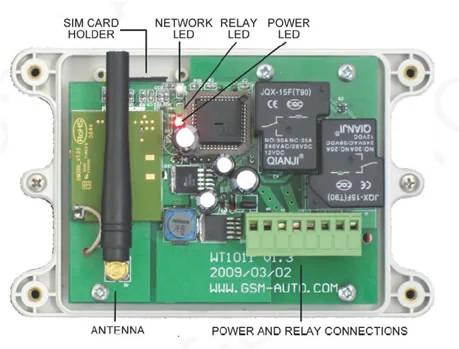
Two independent relays with normally open and normally closed contacts, and a quad-band GSM module that works wherever a GSM network is still running.
| Power supply | 12 V DC, 500 mA (typically 50 mA) |
|---|---|
| Relay contacts | 2 x NO / NC, 10 A @ 230 V AC each |
| GSM bands | 850 / 900 / 1800 / 1900 MHz |
| Operating temperature | -20 °C to +55 °C |
| Size · protection | 130 x 100 x 50 mm · IP65 |
Check the DC supply: positive to terminal 1, negative to terminal 2. Measure for 12 volts.
Not on the network. Activate the SIM, turn off the PIN request, fit an external antenna in weak signal.
Usually marketing calls from the operator. Turn on secure access with #ACM2.
None. The unit rejects the call without answering and switches on the device connected to it. Confirmation text messages are charged at your operator's rate.
Only in open access mode. In secure access mode it responds only to the numbers in its white list.
No, a landline works too. To switch it by text message the landline must be able to send SMS.
Send the switch a text asking for the signal strength once a month. It replies by text, and that outgoing message keeps the card active with most operators.
Yes. Settings are stored in non-volatile memory.